Ready to breathe new life into your wardrobe without spending a fortune? Kimg AI gives DIY fashion enthusiasts a smarter way to plan, visualize, and perfect clothing flips — before a single stitch is made.
I. Why Visualize Before You Customize
Thrifting and upcycling clothes is one of the most creative — and cost-effective — ways to build a personal style. But there’s always that moment of hesitation: will this actually look good? That’s where visualization changes everything.
- Seeing a finished concept before committing to cuts or dye prevents costly mistakes.
- It keeps your creative vision intact from idea to execution.
- You spend less time guessing and more time actually making.
II. What Kimg AI Actually Does
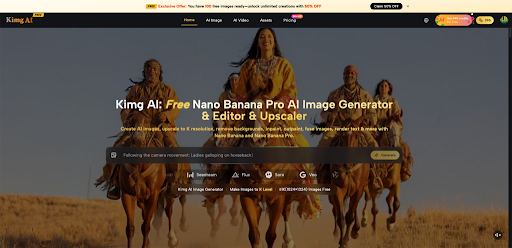
Kimg AI is an image generation and transformation tool that lets users upload reference photos and apply style transfers, edits, and enhancements powered by a suite of AI models. For DIY fashion, this means you can take a photo of an existing garment and reimagine it — completely — in seconds.
- Upload up to 8 reference images at once to guide the AI with multiple style inputs.
- Choose from models like Nano Banana, Nano Banana Pro, Flux, and Seedream depending on the level of detail you need.
- Generated images can reach up to 4K resolution, giving a clear, detailed preview of the final look.
III. Picking the Right Model for Fashion Work
Not every clothing flip needs the same level of detail. Kimg AI offers multiple models, and each suits different stages of the creative process.
- Nano Banana — For Concept Exploration
- Great for quick style transfers: turning a plain shirt into an anime-inspired graphic tee or a Y2K aesthetic piece.
- Supports up to 4 reference images, so you can feed it your garment photo plus style inspiration.
- Ideal when testing multiple directions fast, without needing ultra-fine detail yet.
- Nano Banana Pro AI — For Final Visualization
- The flagship model on Kimg AI, built for professionals who need uncompromising detail.
- Renders hyper-accurate micro-details — individual fabric textures, stitching patterns, material sheen — all at up to 4K quality.
- Best used when you’ve narrowed down the concept and want a near-photorealistic preview before the actual DIY work begins.
- Flux — For Targeted Edits
- Context-aware editing lets you modify one specific part of a garment (say, the collar or hem) without changing the rest.
- Useful for visualizing small but impactful changes like adding embroidery placement or graphic patches.
- Keeps the surrounding design intact while isolating the area being reworked.
IV. How to Flip a Garment Step by Step
The workflow on Kimg AI is straightforward, and it maps naturally to the DIY process.
- Photograph Your Starting Piece
- Take a clean, well-lit photo of the item you plan to upcycle — front and back if needed.
- Flat-lay shots on a neutral background work best for accurate AI interpretation.
- Include close-up shots of any details you want to preserve or modify.
- Gather Style References
- Collect up to 4 reference images that reflect the aesthetic you’re going for — magazine cuts, Pinterest saves, or even photos of garments you already own.
- The more specific the reference, the more precise the output.
- Mix references freely: one for color palette, another for silhouette, another for texture.
- Upload and Prompt on Kimg AI
- Head to Kimg AI, upload your garment photo as the base, and attach your reference images.
- Write a short description of the transformation — for example: “Rework into a cropped tie-dye jacket with distressed hems and raw edges, bohemian style.”
- Select Nano Banana Pro AI for the most detailed output, especially for final previews.
- Review, Iterate, Refine
- Compare variations side by side before settling on a direction.
- Use the Flux model to fine-tune specific zones if the overall output is close but not quite right.
- Save your highest-quality outputs at 4K for use as a physical reference while sewing or customizing.
V. Practical DIY Flip Ideas to Try
Kimg AI handles a wide range of style transformations. Here are some proven starting points:
- Vintage Denim Jacket Rework
- Visualize adding hand-painted motifs, patchwork panels, or bleach splatter effects before touching the actual denim.
- Use Nano Banana Pro AI to render fabric texture so realistic you can judge the weight and finish of the final piece.
- Test light vs. heavy customization looks side by side.
- Oversized Tee to Crop Top
- Preview exactly how much to cut by visualizing different cropped lengths on your specific shirt.
- Add knot styling, raw hem fraying, or graphic print placement into the prompt.
- Avoid the most common mistake: cutting too short without a visual plan.
- Plain Skirt to Statement Piece
- Test embroidery patterns, appliqué placement, or fabric paint designs before committing.
- Swap the skirt’s background entirely to see how the finished piece looks styled as an outfit.
- Use multiple reference images to blend pattern inspirations into one coherent design.
VI. Getting the Best Results
A few practical habits will sharpen the quality of every visualization.
- Lighting matters on upload — photos taken in flat, even daylight give the model the most accurate starting point.
- Be descriptive in prompts — specific language like “raw-edge hem,” “acid wash,” or “patchwork panels in earthy tones” beats vague direction every time.
- Iterate before finalizing — run 2–3 variations with slightly different prompts, then compare before committing to the physical work.
- Use 4K output as your reference sheet — pin it next to your work area while you sew, paint, or cut so the vision stays consistent.
VII. From Visualization to Execution
The gap between a great idea and a great result is usually the inability to see the end goal clearly. Kimg AI closes that gap for DIY fashion by giving makers a tangible, high-resolution visual to work toward.
With models like Nano Banana for rapid ideation and Nano Banana Pro AI for precise, print-quality previews, the tool fits naturally into a maker’s workflow — not as a gimmick, but as a practical planning resource. Whether working on a one-off personal piece or preparing a small batch of upcycled garments to sell, visualizing the result first simply produces better outcomes.
Start with one piece in your wardrobe, upload a clear photo to Kimg AI, and see what it could become.