A useful image rarely appears from one perfect edit. In real creative work, people test, compare, adjust, and decide. That is why an online AI Photo Editor should not be judged only by whether it can produce a polished image in one click. Its bigger value is that it helps users move through visual possibilities faster, without forcing every small idea into a full manual editing session.
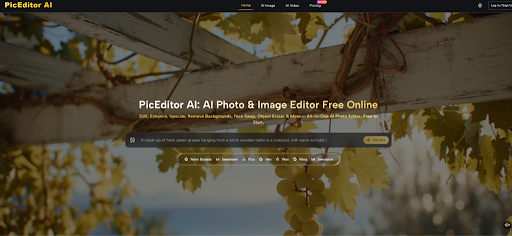
PicEditor AI fits this newer editing habit. The official website presents it as an all-in-one AI photo editing platform for tasks such as image enhancement, upscaling, background removal, object erasing, background replacement, style transfer, AI image generation, image-to-image editing, and photo-to-video style workflows. In plain terms, it is designed for people who want to start with an image or prompt, describe what they want, and let AI help produce a cleaner or more useful visual direction.
Why Modern Editing Starts With Options
Traditional editing often pushes users toward precision too early. Before they even know which direction works, they may spend time adjusting details, fixing selections, testing masks, or exporting drafts. That can be useful for final production, but it is slow during the exploration stage.
PicEditor AI is more interesting when seen as an option-making tool. It lets users test a visual idea before committing to a final direction. A creator can try a cleaner background, a sharper image, a different style, or a more dynamic photo-to-video concept. A marketer can explore campaign visuals. A small shop owner can clean up product imagery without turning every photo into a design project.
The First Draft Does Not Need Perfection
The first AI edit should usually be treated as a direction, not a finished promise. If the image looks close, the user can refine the prompt. If the direction feels wrong, the user can change the instruction and try again.
Iteration Makes AI Editing More Reliable
This is an important mindset. AI editing becomes more practical when users stop expecting every first output to be final. The platform can speed up exploration, but the user still decides what looks natural, credible, and ready to use.
That balance makes the workflow feel realistic. The AI handles the heavy first pass; the user provides judgment and correction.
How The Official Workflow Supports Iteration
The platform’s official workflow is simple: begin with an image task, provide an input, describe the desired change, and review the result. It does not require users to think in layers or manual tools first. The core interaction is image plus instruction.
The steps below follow the site’s actual logic without adding unsupported assumptions about registration, payment, downloads, manual model selection, or fixed usage limits.
Step One: Begin With A Clear Visual Purpose
The first step is deciding what the image should become. The site presents multiple AI editing directions, including enhancement, upscaling, background removal, object erasing, style transfer, AI image generation, image-to-image editing, and photo-to-video workflows.
A Purpose Helps The AI Stay Focused
A clear purpose keeps the edit from becoming random. If the user wants a cleaner ecommerce photo, the task should focus on clarity and background control. If the user wants a more creative visual, the prompt can focus on style, mood, or atmosphere.
Users should not begin with a broad request unless they are intentionally experimenting. Specificity makes the first result easier to judge.
Step Two: Upload Or Generate The Starting Point
For photo editing, the user starts by uploading an image. For generation-focused work, the site also describes text-to-image and image-to-image workflows, where users can create new visuals or transform existing ones based on prompts.
The Starting Image Shapes The Result
A clear source image usually gives the AI a stronger foundation. If the subject is visible, the lighting is understandable, and the composition is not too crowded, the AI has a better chance of producing a useful edit.
A weak source image can still be improved, but expectations should be reasonable. Blurry products, crowded scenes, tiny details, or difficult lighting may require more prompt refinement.
Step Three: Write The First Editing Prompt
The prompt tells the platform what to change. The official workflow emphasizes AI-assisted editing through user instruction, so the written request is not secondary. It is the main control layer.
The First Prompt Should Be Direct
A useful first prompt should explain the target result in plain language. It can mention the background, lighting, sharpness, style, object removal, or desired visual mood. It should also mention anything that must remain stable, such as a product’s shape, a person’s natural appearance, or the original image composition.
The result may vary, especially when the prompt is vague. That is not unusual for AI image editing.
Step Four: Refine The Result With Better Instructions
After reviewing the generated image, the user can adjust the prompt and try again. This is where AI editing becomes practical. Instead of starting from zero, the user can use the previous result as feedback.
Revision Turns Guesswork Into Direction
If the first output changes too much, the next prompt can ask for a more conservative edit. If the image is too plain, the next prompt can ask for a stronger style. If a background looks unnatural, the next prompt can request cleaner lighting or a more realistic scene.
This step is where human judgment matters most. The platform can produce options quickly, but the user decides which option fits the job.
The Platform Is Useful Across Different Workflows
PicEditor AI is not limited to one type of user. Its official feature set makes sense for several practical workflows: content production, ecommerce presentation, social media creation, image cleanup, creative experimentation, and early visual concept development.
The common thread is speed. The platform is useful when a person needs to improve or transform an image without building every edit manually.
Creators Can Test Visual Moods Faster
Creators often need to test whether an image should feel clean, cinematic, playful, artistic, premium, minimal, or more dynamic. These choices can be hard to imagine from the original photo alone.
Style Testing Reduces Creative Uncertainty
Style transfer and image-to-image editing can help users compare different visual directions before choosing one. The goal is not always to create the final image immediately. Sometimes the goal is to discover which direction has potential.
This can be useful for thumbnails, social posts, blog visuals, profile images, and early campaign concepts.
Small Businesses Can Improve Product Presentation
Small businesses often work with imperfect images. A product may be photographed in a cluttered room, under poor light, or against a background that does not match the brand.
Cleaner Images Support Buyer Confidence
Background removal, image enhancement, object erasing, and upscaling can help make product visuals feel more organized. A cleaner image can make the product easier to understand, and that can improve the impression of professionalism.
However, AI editing should not be used blindly. Product shape, color, labels, and important details should be checked before the image is published.
Marketing Teams Can Produce More Drafts
Marketing work often requires many image drafts before one version feels right. A single campaign may need several visual directions, multiple social sizes, cleaner product photos, and fast creative tests.
Faster Drafting Helps Teams Decide Earlier
An AI Image Editor can help teams move from rough idea to visible draft more quickly. That speed is useful because many marketing decisions are easier once people can actually see options.
The tool is not a replacement for strategy or taste. It is a faster way to create visual material that supports decision-making.
A Different Comparison For Real Usage
Instead of comparing PicEditor AI only with professional desktop software, it may be more accurate to compare it with the actual messy workflow many users have today: switching between multiple small tools, asking someone else for edits, downloading apps, or giving up because the process takes too long.
| Real User Situation | Common Manual Workaround | PicEditor AI Direction |
| Product photo looks messy | Crop, blur, or ignore the problem | Remove distractions or change the background |
| Image is too soft | Search for a separate enhancer | Use AI enhancement or upscaling |
| Need a new style | Try filters or manual redesign | Use style transfer or image-to-image prompts |
| Need campaign drafts | Wait for manual design versions | Generate and compare faster visual options |
| Need motion from a photo | Use a separate video tool | Explore photo-to-video style workflows |
| Unsure what looks best | Guess before editing deeply | Test multiple visual directions first |
This comparison shows the platform’s real role. It is not only competing with advanced software. It is also competing with delay, scattered tools, and unfinished visual ideas.
Where Users Should Stay Careful
AI editing is useful, but it does not remove uncertainty. The final result depends on the source image, the clarity of the prompt, and the complexity of the requested edit. Users should expect to review and sometimes revise outputs.
This is especially important when the image will represent a product, a person, or a brand. A fast result is only valuable if it is also accurate enough for the intended use.
Prompt Quality Still Controls The Outcome
A vague prompt can lead to vague edits. A more specific prompt gives the AI a stronger direction. Users should describe the desired result clearly and mention important constraints.
Preserving Details Requires Explicit Instructions
If a product color must stay accurate, say that. If a person’s appearance should remain natural, say that. If the background should change without altering the main subject, say that. These instructions do not guarantee perfection, but they make the request clearer.
The result may still vary. AI image editing can interpret details differently across attempts.
Complex Images May Need More Than One Pass
Not every image is equally easy to edit. Busy backgrounds, overlapping objects, reflective surfaces, detailed hands, faces, small text, and complex lighting can create imperfect results.
Careful Inspection Prevents Bad Publishing Decisions
Before using an output publicly, users should inspect edges, facial details, product features, text, lighting, and any important visual information. If something looks wrong, the image should be revised rather than published.
This review habit makes the platform more useful because it keeps speed from becoming carelessness.
A Better Editing Rhythm For Everyday Work
PicEditor AI is most valuable when it changes the rhythm of image editing. Instead of waiting until every detail is planned, users can start with a photo, describe an edit, review a result, and refine the direction. That makes visual work feel less rigid and more experimental.
The platform’s strength is not that it removes every limitation. It is that it makes common editing tasks easier to attempt. For creators, marketers, ecommerce sellers, and small teams, that can be enough to change how often they improve their images.
Used well, it becomes a practical visual assistant: fast enough for drafts, flexible enough for different image tasks, and simple enough for users who want better images without learning a full professional editing system.