A “Decision Ladder” for AI-Generated Music: How to Go From Vague Taste to a Track You Can Ship

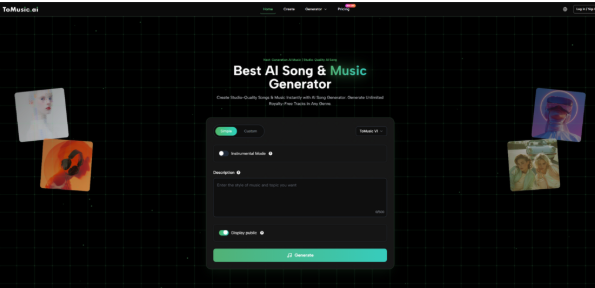
Most people approach AI music like a l machine: prompt in, hope out. The problem is that music is not a single decision. It is a ladder of decisions—what the track is for, how fast it should move, how dense it should feel, and where it should peak. If you skip those decisions and jump straight to “make me something cool,” you end up regenerating endlessly because you do not know what you are optimizing for. What worked better in my own tests was building a decision ladder: a short sequence of choices that turns taste into constraints. Once I started doing that, the workflow became calmer and more repeatable, and the results felt less accidental. For quick auditions, I treat an AI Music Generator as the front door to this process.
Step 1: Define the Job Before You Define the Style
A track that works under voiceover is designed differently than a track meant to be the main event.
Choose one job
- Voiceover bed: supports speech, avoids busy high frequencies
- Hook opener: grabs attention in the first 5–10 seconds
- Emotional build: grows steadily without sudden chaos
- Loopable ambience: stable mood, low distraction
- Brand motif: consistent identity across many pieces
This single choice determines the rest of the ladder. Without it, “genre” is just a label.
Step 2: Decide the Energy Curve (This Controls 80% of “Feel”)
Instead of describing music with adjectives, describe how it behaves over time.
Pick one curve
- Steady: no major peaks, minimal distraction
- Hook-first: strongest moment arrives early
- Slow build: gradual lift, then release
- Peak-and-fade: clear climax, gentle landing
When I did this, evaluation became easier. I stopped arguing about whether a track was “good” and started checking whether it matched the curve I asked for.
Step 3: Set the Density Budget
A lot of “bad” generations are simply too crowded for the use case.
Choose a density level
- Minimal: few elements, lots of space
- Medium: clear groove, controlled layers
- Full: richer arrangement, more movement
If clarity is your priority (tutorials, ads with voiceover), a medium-to-minimal budget usually wins.
Step 4: Use a Constraint Prompt Instead of a Poetic Prompt
Once the job, curve, and density are chosen, you can write a prompt that behaves consistently.
A stable constraint format
- one genre anchor
- two moods
- tempo/energy hint
- one or two texture cues
- one “avoid” item
Example:
“Modern pop, bright and confident, mid-tempo, clean drums, warm bass, avoid heavy distortion.”
This is exactly where I found Text to Music most useful: when I only knew the direction and needed quick, comparable drafts without over-committing to lyrics or structure.
Step 5: Generate Three Takes and Score Them
Instead of generating ten and picking emotionally, generate three and score them logically.
Simple scorecard (0–5)
- Fit: does it match the job and curve?
- Clarity: is it clean or crowded?
- Movement: does it lift at the right time?
- Usability: can it sit under your edit today?
Pick the best overall take. Then refine.
Step 6: Iterate With One Variable Only
The fastest way to waste time is to rewrite the entire prompt after every run.
One-variable iteration options
- tempo: slower/faster
- mood: warmer/darker
- density: minimal/full
- texture: acoustic/synthy
- vocal presence: less/more
In my testing mindset, the biggest gains came from disciplined, single-variable changes. It makes improvement traceable.
Where This Fits in a Publishing Workflow
If you publish frequently, you want a system that reduces decision fatigue.
That is why I treat AI Music Generator as a production tool for fast auditions: brief, generate, score, refine, export, and move on. It is less about “finding the best song” and more about finding a track that reliably fits the content you are actually shipping.
Limitations That Keep Expectations Real
A good workflow needs honest constraints.
- Variability is normal: two runs can sound meaningfully different.
- Crowding happens: too many cues can create indecisive arrangements.
- Sometimes you need multiple drafts: not because the tool is “bad,” but because creative direction is inherently iterative.
If you expect iteration, and you structure it, the process becomes efficient rather than frustrating.
A 12-Minute Session Template
- Choose the job (voiceover bed / hook opener / build / loop).
- Choose the energy curve (steady / hook-first / slow build / peak-and-fade).
- Set density (minimal / medium / full).
- Write a constraint prompt (genre anchor + two moods + tempo + two textures + avoid).
- Generate three takes, score them, and iterate one variable only.
- Test under your real edit before generating again.
This decision ladder turns “taste” into a repeatable method—so the music you generate feels designed for your project, not randomly lucky.