Smartphone photography has advanced significantly, producing breathtaking photographs when used correctly. Understanding how to modify settings such as resolution, exposure, and focus will help your images look more professional and appealing. Whether you are a casual shooter or a photography fanatic, knowing these settings gives you greater control over your images. From simple everyday settings to extreme pro modes, understanding how to fine-tune your smartphone camera offers you a world of creative possibilities. In this lesson, we’ll look at the finest camera settings to improve your smartphone photography skills.
Why Do Camera Settings Matter in Smartphone Photography?
Camera settings are the foundation of smartphone photography, determining how your photographs turn out. Even while smartphone cameras use modern technologies, understanding how to adjust settings provides you with more control over your photographs. Adjusting aspects such as resolution, focus, and exposure allows you to take photographs in a variety of lighting settings, generate realistic colors, and obtain greater detail. These options might help you avoid typical issues such as motion blur, poor lighting, and low-quality photographs. Smartphone makers frequently provide AI-powered capabilities, but their default settings may not always fit your creative vision. Understanding when and how to adjust the settings allows you to capture images with greater precision and elegance.
Best Camera Settings for Everyday Smartphone Photography
Resolution, Aspect Ratio, and Image Quality Settings
For most ordinary smartphone photography, the resolution and aspect ratio settings are critical to producing high-quality results. Higher resolution allows for more information; however, the aspect ratio dictates how your photos are framed. Common selections are 4:3 for more conventional photographs and 16:9 for broader, cinematic views. Adjusting the image quality settings also guarantees that your photos remain clear and sharp. Many cellphones let you select between compressed and uncompressed formats. The uncompressed version, despite requiring more storage, retains the maximum information. For everyday usage, choose a resolution that combines photo quality and storage space while picking an aspect ratio that complements the composition.
HDR, AI Enhancement, and Scene Optimization
HDR (High Dynamic Range) is an essential option for regular smartphone photography, particularly in low-light circumstances. It helps to balance the exposure of your images’ dark and bright parts, allowing you to capture more detail. Another important feature is AI enhancement, which automatically changes brightness, contrast, and sharpness depending on the situation. It’s great for novices because it optimizes photographs with minimal work. Scenario optimization detects the kind of scenario (such as sunset, portrait, or landscape) and changes settings accordingly. While these features make photography easier, turning them off in some situations allows you to have greater control over the end product.
Focus, Exposure Lock, and White Balance Basics
Focus, exposure lock, and white balance are all necessary for taking crisp, perfectly colored images. Using the tap-to-focus function, you can locate the topic and guarantee it is crisp. Exposure lock allows you to maintain constant exposure levels, particularly in dynamic lighting circumstances. When utilizing exposure lock, just tap the screen to adjust the exposure and then lock it in place for greater control. White balance changes the colors in your images so they appear natural and not too warm or chilly. It is especially critical when photographing under artificial illumination. Fine-tuning these parameters allows you to create clear, vivid, and well-lit photographs with correct colors.
What Are the Best Pro Mode Settings for Smartphone Cameras?
ISO, Shutter Speed, and Noise Control
You may adjust ISO and shutter speed in Pro Mode, giving you greater control over the final product of your images. Higher ISO values are helpful in low light but may create noise. ISO controls the camera’s sensitivity to light. The length of time the camera’s sensor is exposed to light is controlled by adjusting the shutter speed, which affects motion blur. While a greater shutter speed stops motion, a slower shutter speed captures more light but may result in motion blur. In order to minimize noise and maintain appropriate exposure in a variety of lighting conditions, it is essential to balance ISO and shutter speed.
Manual Focus and Exposure Compensation Tips
Manual focus provides you with total control over where the camera focuses, allowing you to compose more dynamic images. This option is helpful for macro photography or when you want to highlight a single subject while blurring the backdrop. Another useful function is exposure compensation, which allows you to modify the exposure level if your image is too bright or too dark. Positive or negative compensation can be used to avoid overexposed highlights or underexposed shadows. Using manual focus and exposure compensation in Pro Mode lets you shoot photographs with more exact changes, giving you more creative control.
Shooting in RAW Format
Shooting in RAW format produces the greatest quality images by recording raw data straight from the camera sensor. RAW files preserve more detail in highlights, shadows, and colors, allowing for greater editing freedom. You may make big changes without sacrificing image quality. However, RAW files are substantially bigger than JPEGs, requiring more storage space. RAW files also require post-processing in software such as Adobe Lightroom to reach their full potential. If you want little processing or have limited storage space, shooting in JPEG may be more practical, but RAW is a great tool for dedicated photographers.
Conclusion
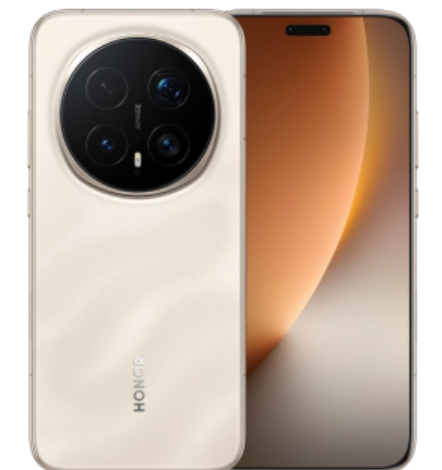
Mastering smartphone camera settings is a game-changer for taking beautiful photos. While automated settings and AI functions are helpful, learning how to change resolution, focus, exposure, and ISO opens up a world of creative possibilities. Whether you’re capturing daily photos or experimenting with Pro Mode, these settings can help you get professional-level images. Photographers may maximize the potential of their smartphone by understanding when to utilize manual controls, resulting in photographs that reflect their distinct perspective. With the correct knowledge and skill, your smartphone can be a great instrument for taking stunning, high-quality photos. For those considering upgrading their device, checking the HONOR Magic 8 pro price in uk can help you make an informed decision.