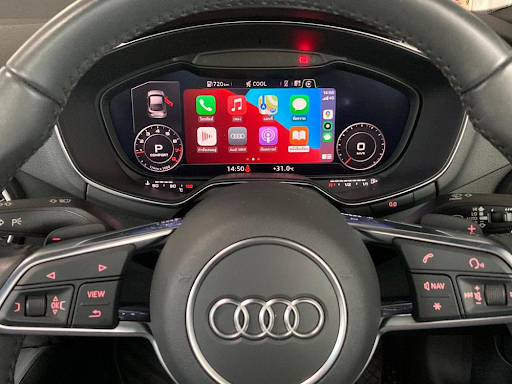
Upgrading the Audi CarPlay experience can greatly enhance connectivity and access to essential apps while driving. To successfully upgrade Audi CarPlay, owners should check their vehicle’s software version and ensure that they have the latest updates installed. This can often be done through the Audi MMI system or the Audi connect app.
In addition to software updates, adding features like Android Auto alongside Apple CarPlay can provide users with more options. Many Audi models support both systems, allowing drivers to choose what works best for their smartphones. The right upgrades can optimize usability and improve the overall driving experience.
It’s important for Audi owners to stay informed about new updates and features that enhance their vehicles’ technology. Exploring options for software upgrades or compatibility enhancements ensures that they can take full advantage of everything Audi and CarPlay have to offer.
Understanding CarPlay and Audi MMI
CarPlay enhances the driving experience by connecting smartphones to vehicles. Audi MMI, or Multi Media Interface, serves as the control system for navigation and multimedia. Understanding both systems helps Audi owners take full advantage of their features.
Overview of CarPlay
CarPlay is an Apple feature that allows users to connect their iPhones to their car’s infotainment system. This connection enables easier access to apps, navigation, and phone calls.
Key functions include:
- Navigation: Users can utilize Apple Maps for directions.
- Communication: Make and receive calls or send messages hands-free.
- Music: Access various music apps like Apple Music and Spotify.
With Bluetooth connectivity, CarPlay sets up seamlessly with compatible Audi models. Voice control features allow safe operation while driving, making it a convenient choice for Audi owners.
Basics of Audi MMI
Audi MMI, or Multi Media Interface, is designed to control various vehicle functions. It integrates navigation, multimedia, and communication.
Key features of MMI include:
- MMI 3G Basic System: Offers standard functionalities for navigation and multimedia.
- Navigation: Provides real-time traffic updates and route options.
- Voice Control: Enables users to give commands without taking their hands off the wheel.
The interface can be accessed through a central console, touchscreen, or voice commands. MMI’s compatibility with CarPlay further enhances its usability by allowing seamless integration with smartphones.
Upgrading to Apple CarPlay in Your Audi
Adding Apple CarPlay to an Audi enhances the driving experience. It provides easy access to apps, navigation, and music. Key steps include checking compatibility, following the upgrade process, and considering firmware updates.
Compatibility and Requirements
Before starting the upgrade, it is essential to check if the Audi model supports Apple CarPlay. Most Audi vehicles from 2017 onwards generally have this feature. Wireless CarPlay is available in some newer models.
To use CarPlay, a compatible iPhone is required, typically an iPhone 5 or later. Users must also ensure their vehicle’s software is up to date. Visit the manufacturer’s website or the local dealership to confirm compatibility and software requirements.
Step-By-Step Upgrade Process
- Check Your Audi’s Infotainment System: Access the menu and look for system settings. Verify if CarPlay is listed.
- Download the Necessary Software: If the system isn’t updated, download the latest firmware from Audi’s official site.
- Connect the iPhone: Use a USB cable to connect the iPhone to the Audi’s USB port. Some models support wireless connections after initial setup.
- Enable CarPlay: On the iPhone, go to Settings > General > CarPlay, then select the Audi. Follow prompts on the screen.
- Customize CarPlay Settings: Once connected, users can customize the app layout and display preferences.
Following these steps will enable Apple CarPlay for a seamless experience.
Firmware Update Considerations
Before upgrading, updating the vehicle’s firmware may be necessary for compatibility with CarPlay. Audi offers software updates for many models.
To check for firmware updates:
- Access the settings in the infotainment system.
- Look for system updates or check the Audi website for instructions.
Always back up any important data before starting the update process. Updating software can improve performance and provide new features, ensuring the best experience with Apple CarPlay in an Audi.
Enhancing Your Driving Experience
Upgrading to the latest features in Audi CarPlay can significantly improve the driving experience. Key improvements include better navigation options, multimedia integration, and safety features.
Navigation and Mapping Apps
Navigation apps play a crucial role in enhancing the driving experience. Apple Maps, Google Maps, and Waze provide real-time traffic updates and route planning. Using these apps allows drivers to avoid congested areas and find the quickest routes.
With Wireless CarPlay, connecting to these apps becomes seamless. This means less hassle with wires and more focus on the road. Drivers can set their destination with voice commands, keeping their hands on the wheel. The user-friendly interface also helps minimize distractions.
Integrating Multimedia and Entertainment
Entertainment options are vital for making drives enjoyable. CarPlay allows easy access to music and podcasts through apps like Spotify. This adds a personal touch to any journey.
Users can control playback using voice commands, making it safer to change songs or pause. Audi’s integration with CarPlay ensures high-quality audio from the car’s speakers. Drivers can also connect to their favorite radio stations easily.
The entertainment system becomes an extension of personal devices, providing diverse content while on the go. Enjoying selected playlists or listening to the latest podcast can transform commutes and long trips.
Safety and Connectivity Features
Safety is a top priority in any vehicle upgrade. Audi CarPlay enhances this with hands-free calling and messaging. Users can communicate without taking their eyes off the road, reducing distractions.
Features like crash detection and emergency calling are also integrated. These ensure that help can be reached quickly if needed. Regular software updates keep safety features current, ensuring maximum protection.
Connectivity options enable easy sync with other smart devices. This can include alerts for upcoming appointments or reminders, making it easier to stay organized while driving. With these advancements, Audi CarPlay significantly improves the overall safety and efficiency on the road. For more seamless integration, check out Audi Carplay for enhanced features.
Alternative Solutions and Considerations
When upgrading CarPlay in an Audi, there are several options to explore. Users can consider using Android Auto, aftermarket upgrades, or weigh the pros and cons of upgrading their current system.
Android Auto for Audi Users
Android Auto provides a viable alternative for Audi users who have Android devices. This system allows users to connect their phones and access apps, navigation, and music through the car’s display.
To use Android Auto, the car must be compatible with the system. Many Audi models support Android Auto directly. Users should check their vehicle’s manual for compatibility.
Benefits include easy access to Google Maps, Spotify, and messaging apps. The interface is user-friendly and designed for safety while driving. Users can switch back to CarPlay if they own multiple devices. Compatibility with both systems offers flexibility.
Aftermarket Upgrades
Aftermarket head units can significantly enhance the Audi’s infotainment system. Brands like Pioneer offer head units that support both CarPlay and Android Auto.
Installing an aftermarket unit often improves connectivity options. Users can gain features like larger screens and better sound quality. It’s essential to find units specifically designed for Audi models for seamless integration.
Installation may require professional help or detailed guidance if attempted independently. This can increase the overall cost but ensures that the setup works correctly. Potential users should research compatibility and reviews before making a purchase.
Pros and Cons of Upgrading
Upgrading CarPlay or installing an aftermarket unit comes with advantages and disadvantages.
Pros:
- Enhanced functionality with modern features.
- Access to both CarPlay and Android Auto.
- Improved audio and visual quality.
Cons:
- Installation costs for aftermarket systems can be high.
- Compatibility issues with vehicle controls may arise.
- Upgrading might void the factory warranty.
Each user should evaluate their specific needs. Balancing benefits with potential drawbacks can help in making the right choice for their Audi’s infotainment upgrade.


