A useful image can start with a phone portrait, an old family photograph, or an idea for a social media post. The difficult part is turning that starting point into something suitable for sharing. A background feels distracting, the image has the wrong proportions, or the visual you need doesn’t exist yet.
AI image tools are making these smaller creative jobs more approachable. They suit online content such as entertainment posts and video thumbnails, as well as personal projects.
Start with the Photo You Already Have
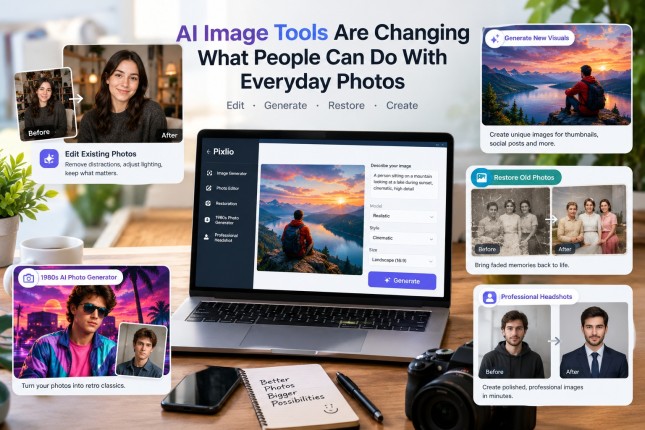
Suppose you have a portrait you want to use as a channel profile picture. The expression is right, but the room behind you is cluttered. With an AI image editor, you can upload the original and describe the change instead of manually cutting around the subject.
A useful instruction might be: “Replace the background with a softly lit recording studio. Keep the person’s face, hairstyle and clothing as close to the original as possible.”
Pixlio supports this reference-based workflow. Users can choose an editing model, review the result, and use the edited image as the starting point for another adjustment. That helps when the background works but the lighting needs adjustment. Specific instructions give you more control over what should change and what should stay.
Create a Visual When There Is No Starting Photo
Some projects call for an entirely new scene. A film discussion channel might want an atmospheric image of an empty cinema. Someone planning a themed event may need artwork in a particular colour palette.
Pixlio AI image generator works from written descriptions, with choices of models, styles and image dimensions depending on the selected model. A thumbnail prompt could request a wide composition with the main subject on the right and clear space on the left for a headline.
Once the first image exists, users can switch to image-based editing in the same workspace. That helps when one element needs changing. Pixlio also shows estimated credit costs before generation, so experimenting doesn’t have to be a complete guess.
Some Image Jobs Benefit from a Dedicated Tool
Pixlio is also an AI image creative studio with tools built around particular situations. They provide a more guided starting point for people who know what they want but don’t want to write detailed prompts.
Its 1980s AI Photo Generator, for instance, lets someone turn a clear portrait into an imagined retro studio or snapshot-style photo. That fits the kind of playful throwback content people share around birthdays or themed events. The AI Photo Restoration tool takes a different approach, offering options to improve resolution, correct faded colours and reduce scratches in old photographs.
There’s also an AI Professional Headshot tool for turning a casual portrait into a business-style image, with selectable clothing and studio backgrounds. Each has controls suited to its purpose.
|
Starting situation |
Sensible first step |
What to check before using |
| Existing photo with an unwanted background | Edit the image using a reference | Whether the original subject still looks natural |
| New artwork for a thumbnail or social post | Generate from a written prompt | Composition, legibility and space for text |
| Old, scratched family photograph | Use photo restoration | Whether faces and historical details remain faithful |
| Portrait for a themed throwback post | Try the 1980s photo tool | Whether the result is clearly presented as AI-created |
Keep Working with a Useful Result
An image is often needed in more than one format. A creator may start with a wide thumbnail, then need a taller image for a story or a larger version for a poster.
Pixlio’s result controls can pass a selected image into separate tools for upscaling, background removal, canvas extension or video creation. Each opens a separate tool with the image ready for further processing. Recent creations can also be reopened, which makes it easier to pick up a project later.
It’s worth looking closely at each output before publishing. AI may alter facial details, invent lettering or change an object you intended to preserve. Older photographs deserve particular care: restoration should help make an existing record clearer, while a retro transformation should be labelled as a creative interpretation.
For everyday projects, moving from a generated image to an edit or specialised tool in one workspace saves some of the routine setup. The final judgment still belongs to the person choosing what to share.