If you’ve ever spent hours reconciling paper timesheets with payroll spreadsheets, you know the frustration of mismatched numbers, buddy punching, and costly errors that slip through the cracks. When attendance tracking and payroll processing live in separate systems, the gap between them fills with manual data entry, human mistakes, and wasted administrative hours that drain your team’s productivity. Biometric time clocks—particularly fingerprint-based systems—offer a modern solution that bridges this divide entirely. By capturing precise clock-in and clock-out data through unique biological identifiers, these systems feed accurate attendance information directly into your payroll software, eliminating guesswork and reducing processing time dramatically. Consider this: how many hours does your team currently spend each pay period verifying timesheets, correcting discrepancies, and manually entering attendance data? For most small businesses and HR departments, the answer is far too many. When attendance data flows seamlessly into payroll calculations, you reclaim those hours while gaining confidence that every employee is paid accurately for the time they actually worked.
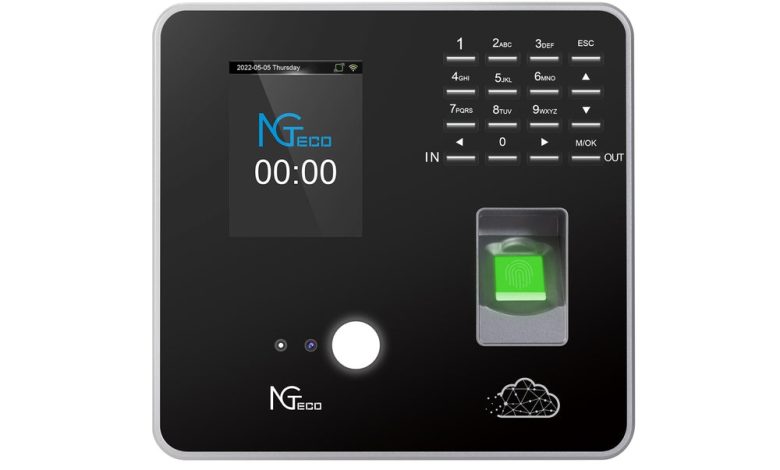
A biometric time clock is an attendance tracking device that identifies employees through unique physical characteristics rather than cards, codes, or passwords. Fingerprint-based systems remain the most widely adopted variety, using optical or capacitive sensors to capture the ridge patterns, minutiae points, and valley structures of an employee’s fingerprint. When someone clocks in, the scanner converts their fingerprint into an encrypted digital template and matches it against stored records in seconds—confirming identity with near-perfect accuracy.
Compare this to traditional methods: paper timesheets rely on employee honesty and are prone to transcription errors, while basic punch cards invite buddy punching, where one worker clocks in for an absent colleague. Fingerprint systems eliminate both problems entirely because a biological identifier cannot be shared, forgotten, or forged.
Modern smart attendance systems extend well beyond the physical scanner on your wall. Today’s platforms operate on cloud-based infrastructure, giving managers remote access to attendance dashboards from any browser or mobile device. Real-time data means you see who’s on-site the moment they arrive, not hours later when someone processes a stack of cards. Many systems also support mobile clock-in for remote or field-based employees, using fingerprint readers on company-issued devices.
Regarding privacy concerns, reputable systems never store actual fingerprint images. Instead, they retain only encrypted mathematical templates that cannot be reverse-engineered into a usable print. Data is protected through AES-256 encryption both in transit and at rest, and access controls ensure only authorized administrators can manage biometric records. When an employee leaves the organization, their template can be permanently deleted in compliance with data protection regulations.
The Power of Integration: Merging Attendance and Payroll Systems
System integration, in the context of attendance management, means creating a direct data pipeline between your biometric time clock and your payroll processing software. Rather than exporting CSV files, printing reports, or manually keying hours into a separate payroll platform, an integrated system automatically transfers verified attendance records—clock-in times, clock-out times, break durations, and overtime hours—into your payroll calculations without human intervention.
This direct connection solves several persistent problems simultaneously. Manual data entry between systems introduces transcription errors that compound over time; a misplaced decimal or transposed digit can mean overpaying one employee while shortchanging another. Integration eliminates this risk entirely because the data only needs to be captured once—at the biometric scanner—and then flows untouched into payroll. Compliance with labor laws also becomes more manageable when the system automatically flags overtime thresholds, missed breaks, and scheduling violations in real time rather than during a retroactive audit.
For HR managers overseeing multiple departments, integration delivers automated, department-specific attendance tracking that feeds directly into segmented payroll processing. You can instantly see labor distribution across teams, identify patterns of tardiness or absenteeism, and generate compliance reports without pulling data from multiple sources. The streamlined workflow means payroll runs that once consumed an entire day can be completed in under an hour.
Small business owners gain equally tangible advantages. Accurate labor cost reporting becomes automatic—you always know exactly what you’re spending on wages relative to revenue, broken down by project, department, or location. The administrative hours previously devoted to timesheet verification and payroll corrections return to your calendar, time you can redirect toward operations, customer relationships, or strategic planning. When every worked minute is captured accurately and paid correctly, employee trust increases and payroll disputes virtually disappear.
Step-by-Step Guide to Implementing Your Integrated System
Moving from concept to functioning integrated system requires methodical planning. Here’s a practical roadmap that walks you through each phase of implementation, from initial assessment to full deployment.
Step 1: Assessing Your Needs. Start by documenting your current workforce structure. How many employees need to clock in daily? Do you operate single shifts, rotating schedules, or split shifts across multiple locations? Identify which payroll software you currently use and whether it supports third-party integrations through APIs or built-in connectors. Map out your pain points—maybe overtime calculations consume excessive time, or buddy punching inflates labor costs by several percentage points each month. This assessment becomes your requirements checklist for evaluating solutions.
Step 2: Choosing the Right Fingerprint Time Attendance Software. With your requirements defined, evaluate platforms against specific criteria. Prioritize cloud-based access so managers can monitor attendance remotely and approve exceptions without being on-site. Confirm that the software offers API capabilities or native integration with your existing payroll platform—this is non-negotiable for seamless data flow. Look for scalability features that accommodate workforce growth without requiring a complete system overhaul. Multi-location support, role-based access permissions, and customizable reporting round out the essential feature set.
Step 3: Hardware Setup and Employee Enrollment. Position biometric time clocks at high-traffic entry points where employees naturally pass during arrival and departure. Hardware manufacturers like NGteco offer fingerprint time attendance software and time clock devices designed for high-volume environments, with durable sensors that maintain accuracy even under heavy daily use. Consider traffic flow to prevent bottlenecks during shift changes—mounting multiple devices at busy locations reduces wait times significantly. During enrollment, capture two or three fingerprints per employee to account for situations where a primary finger might be bandaged or dirty. Communicate clearly that the system stores encrypted templates, not actual fingerprint images, to ease privacy concerns during this phase.
Step 4: Software Configuration and Payroll Integration. Configure your attendance rules within the platform: define grace periods for late arrivals, set overtime thresholds that match local labor regulations, establish break deduction policies, and create shift categories that align with your scheduling structure. Then establish the data connection to your payroll software. Most modern platforms offer guided integration wizards—map attendance fields to corresponding payroll fields, verify that hours transfer correctly with a test batch, and confirm that overtime, holiday pay, and differential rates calculate accurately before going live.
Step 5: Training and Rollout. Train HR administrators and department managers first, ensuring they understand how to handle exceptions, approve time-off requests, and generate reports. Then communicate changes to all employees through brief orientation sessions that demonstrate the clock-in process and explain how the system benefits them—faster payroll processing, fewer pay errors, and transparent records they can verify themselves. Consider a parallel-run period of one to two pay cycles where both old and new systems operate simultaneously, allowing you to validate accuracy before fully retiring manual processes.
Optimizing Workforce Scheduling with Integrated Data
Once your biometric attendance data flows directly into a unified platform, scheduling transforms from a reactive guessing game into a strategic, data-driven process. Instead of building next week’s schedule based on assumptions or outdated patterns, you can analyze actual attendance trends—peak arrival times, frequent absence days, and overtime concentrations—to forecast labor needs with precision. If Tuesday afternoons consistently show higher absenteeism in your warehouse team, you can proactively schedule additional coverage rather than scrambling for last-minute replacements.
The real advantage emerges when scheduling and attendance tracking live within the same platform. Managers can create, adjust, and publish schedules directly alongside real-time clock-in data, instantly seeing whether current staffing levels match planned coverage. When an employee calls in sick, the system identifies available team members based on their recorded hours, overtime eligibility, and shift preferences—then notifies them automatically. This eliminates the chain of phone calls that typically consumes a supervisor’s morning.
For small business owners managing diverse shift structures—split shifts, rotating rosters, or seasonal fluctuations—integrated scheduling provides the flexibility to adapt without administrative overhead. You can build templates for recurring patterns while retaining the ability to make one-off adjustments that immediately reflect in both attendance expectations and payroll calculations. Employees benefit too, gaining visibility into upcoming schedules through self-service portals and receiving automatic notifications when changes occur. This transparency reduces no-shows, improves morale, and ensures that labor costs align precisely with operational demand rather than inflated estimates built on incomplete information.
Overcoming Common Challenges and Ensuring Success
Every technology transition encounters friction, and biometric time clock integration is no exception. Employee resistance often tops the list—some workers feel uneasy about providing fingerprint data, while others simply resist changing familiar routines. Address this head-on through transparent communication before implementation begins. Explain exactly what data is stored (encrypted templates, not images), how it protects them from time theft accusations, and how faster payroll processing benefits everyone. When employees understand the system prevents pay errors that could shortchange them, resistance typically fades quickly.
Initial cost concerns deserve honest acknowledgment. Hardware, software licensing, and setup time represent real investment. However, frame the conversation around long-term ROI: reduced payroll errors, eliminated buddy punching, and recovered administrative hours typically offset implementation costs within six to twelve months. Calculate your current cost of manual processing—including correction cycles and compliance penalties—and the financial case becomes clear.
Technical integration issues arise most often when legacy payroll platforms lack modern API support. Mitigate this by choosing attendance software vendors that offer dedicated integration support, pre-built connectors for popular payroll systems, and responsive technical teams who can troubleshoot mapping errors during setup. Request a sandbox environment to test data flow before committing fully.
For ongoing success, schedule quarterly system reviews to verify that attendance rules still match current labor regulations, that new hires are enrolled promptly, and that integration connections remain stable. Keep biometric scanners clean and calibrated, update firmware regularly, and maintain a backup enrollment finger for every employee. These maintenance habits ensure your integrated system delivers consistent accuracy year after year rather than degrading into another source of administrative headaches.
Transform Your Payroll Workflow with Biometric Integration
Integrating biometric time clocks with payroll software represents more than a technology upgrade—it’s a fundamental shift in how your organization handles its most repetitive and error-prone administrative processes. Fingerprint-based attendance systems deliver the accuracy that manual methods simply cannot match, capturing every worked minute through unforgeable biological identifiers. When that precise data flows automatically into payroll calculations, you eliminate the transcription errors, buddy punching losses, and reconciliation headaches that have long plagued workforce management.
For HR managers, this integration means streamlined compliance, department-level visibility, and payroll runs completed in a fraction of the time previously required. For small business owners, it translates into accurate labor cost tracking, recovered administrative hours, and the confidence that comes from knowing every dollar spent on wages reflects actual work performed. Both audiences gain a foundation for smarter scheduling, better forecasting, and stronger employee trust.
The businesses thriving in today’s environment are those embracing automation where it matters most—at the intersection of time, money, and people. Take an honest look at your current attendance and payroll workflow. Count the hours spent on manual entry, the corrections made each pay period, and the disputes that arise from inaccurate records. Then ask yourself whether that’s a sustainable use of your team’s energy, or whether it’s time to let integrated biometric systems handle what they do best so you can focus on growing your business.