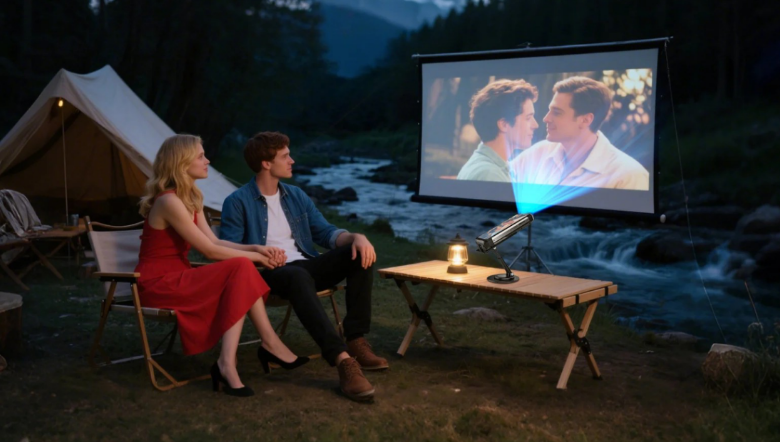
A projector phone can make downtime outdoors feel special. After hiking, fishing, or driving all day, it is nice to watch a movie, share photos, or show a bigger view of something for everyone to see.
“Phone projector” means a projector phone, which is a smartphone with a built-in projector. It can project images and videos directly from the phone itself. You do not need to connect it to another smartphone to make the projection work.
Outdoor projection still has limits. You need darkness for a clear image. You also need a steady setup and a power plan that fits your trip. When you choose the right device for how you travel, projection feels easy instead of frustrating.
What makes a phone projector work outdoors?
A phone projector works outdoors when it can project directly from the phone, looks clear enough at night, and stays steady on rough surfaces.
Built-in projection basics
A projector phone projects what the phone is already playing. You open a video, photo album, or app on the same device, then switch on projection mode to display it on a wall, sheet, or screen.
This is what makes the category useful for travel. You are not packing a separate projector just to get a large image. You are also not relying on a second phone to feed video to a projector.
Match it to your trip style
If you backpack, you will care more about size and weight. If you car camp, you can care more about comfort, projection time, and screen size.
If you travel with a group, sound and viewing distance start to matter more. If you travel solo, quick setup and battery control may matter most.
Know the light limits
Outdoor projection works best in full darkness. Even if a campsite feels quiet, light from lanterns, campfires, or nearby sites can wash out the image.
If you want the easiest upgrade, project later and keep lights behind the viewers, not near the screen surface.
How bright does it need to be at camp?
It needs to be bright enough for the darkness you actually have, because outdoor “night” still includes moonlight and campsite lighting.
Use ANSI lumens when possible
Brightness labels can be confusing. When a device lists ANSI lumens, it is easier to compare because ANSI is a more standard measure.
Even with a rating, real use matters more than the number alone. A darker campsite and a smaller projected image can make the picture look much brighter.
Keep the image smaller for more brightness
Image size is a simple control you can use at camp. A bigger image looks dimmer because the light spreads out. A smaller image often looks brighter and clearer.
If the picture looks weak, move the projector phone closer to the surface and reduce the image size. This is often the fastest fix outdoors.
Pick a “sharp enough” resolution
Resolution helps most when you want to read text. For movies and casual videos, sharp focus and a steady image usually matter more than chasing top resolution.
If you plan to use projection for maps, instructions, or slides, text clarity becomes more important. If you mainly watch videos, brightness and stability usually decide the experience.
How do you handle power and heat off-grid?
You handle it by planning for higher battery use during projection, having a charging plan, and keeping the phone ventilated during long sessions.
Expect faster battery drain
Projection draws more power than normal phone use. That is expected because the phone is running the projector hardware while also running media.
If you want fewer problems outdoors, download your videos before the trip. Streaming can fail in weak signal areas, and it can drain the battery faster.
In real use, a projector phone for outdoor adventure is often limited more by power than by features. A great image does not help if the battery ends early.
Plan charging during use
Your charging plan should match your trip. Car campers can often recharge from a vehicle or power station. Backpackers usually depend on a power bank and shorter sessions.
If your device supports charging while projecting, that can make long sessions easier. Since charging behavior can vary by model, test it at home with the same charger and cable you plan to bring.
Keep airflow around the device
Projection can create heat, and charging can add more. Heat usually becomes an issue when the phone cannot release it.
Keep the projector phone on a hard surface. Avoid thick fabric under it. Keep it out of direct sun while it is projecting. If it feels hot, pause for a few minutes and let it cool.
How do you get a straight picture and clear sound?
You get the best result by stabilizing the projector phone first, then adjusting focus, then improving audio for an open outdoor space.
Adjust distance and focus first
If the image looks blurry, focus is usually the issue. If you move the phone closer or farther to change the image size, the focus often needs a quick adjustment again.
A stable stand helps here. When the phone is steady, it is easier to focus well, and the picture is nicer to watch.
Use keystone only when needed
If the projector phone is tilted, the image can look like a trapezoid. Keystone correction can help square the picture.
Still, good placement usually looks better than heavy correction. If you aim straight at the center of the screen surface, the image tends to look cleaner and more natural.
Improve sound the simple way
Outdoor sound spreads out fast. Built-in speakers can work if you sit close, but groups often want clearer audio.
If your projector phone supports it, a small speaker can help. Place the speaker near the viewers, not near the screen. That way, you hear voices better without pushing the volume too high.
When is a rugged projector phone worth it?
It is worth it when you want a built-in projection plus a tougher phone body, so you do not worry as much about dust, drops, and rough handling.
Why rugged design helps outdoors
Outdoor trips involve dust, damp hands, and quick setup on uneven ground. A rugged build helps the phone handle normal travel stress. Rugged does not mean you should treat it carelessly. It just means small accidents are less likely to ruin your night.
Why is the all-in-one gear easier?
A separate projector setup adds another device to pack, charge, and protect. A projector phone keeps things simple because the projector and the media source are the same device.
Where the phone projector and TANK 4 Pro fit
If you are browsing this category, it helps to start with projector phones that are designed for outdoor conditions, not devices meant only for indoor shelves. If you want a quick starting point, look at the phone projector options and focus on real travel needs like darkness performance, battery planning, and setup stability.
If you want a rugged phone with a projector to review in that group, the 8849 TANK 4 Pro is one model people can consider when they want built-in projection plus a tougher body for trips.
Conclusion
The right projector phone for outdoor travel is the one that works where you actually camp. You want an image that looks good in full darkness, a setup that stays steady on uneven ground, and a power plan that does not end early. If the picture looks dim, shrinking the image usually fixes it fast. If the image looks crooked, better placement often helps more than heavy correction. If the sound feels weak, placing a small speaker near the group can make a big difference.
If you like the idea of projecting without carrying a separate projector, a projector phone can simplify your kit. Once you know your light conditions, your typical session length, and how you recharge off-grid, it becomes much easier to pick the right device for your next trip.